This is default featured slide 1 title

Go to Blogger edit html and find these sentences.Now replace these sentences with your own descriptions.This theme is Bloggerized by Lasantha Bandara - Premiumbloggertemplates.com.

This is default featured slide 2 title

Go to Blogger edit html and find these sentences.Now replace these sentences with your own descriptions.This theme is Bloggerized by Lasantha Bandara - Premiumbloggertemplates.com.

This is default featured slide 3 title

Go to Blogger edit html and find these sentences.Now replace these sentences with your own descriptions.This theme is Bloggerized by Lasantha Bandara - Premiumbloggertemplates.com.

This is default featured slide 4 title

Go to Blogger edit html and find these sentences.Now replace these sentences with your own descriptions.This theme is Bloggerized by Lasantha Bandara - Premiumbloggertemplates.com.

This is default featured slide 5 title

Go to Blogger edit html and find these sentences.Now replace these sentences with your own descriptions.This theme is Bloggerized by Lasantha Bandara - Premiumbloggertemplates.com.

Tuesday, 8 April 2014

Character map

Character map


Using Character Map:

You can use Character Map to copy and paste special characters into your documents, such as the trademark symbol, special mathematical characters, or a character from the character set of another language.

Open Character Map:

To open character map click Start>Programs>Accessories>System Tools>Character Map.

ALT Codes


There are certain symbols/characters that cannot be found on the keyboard,but can be typed using alt codes.
Open Notepad or any other text editors and try these codes.


Note:If you don't know to use numpad on laptop,click here.

Special folders in windows

Did you know that you cannot create any folder of the name "con",aux" or "nul" in windows.

So you tried it.. and its not working.
Well here's the solution.
  1. Rename folder from the right click option
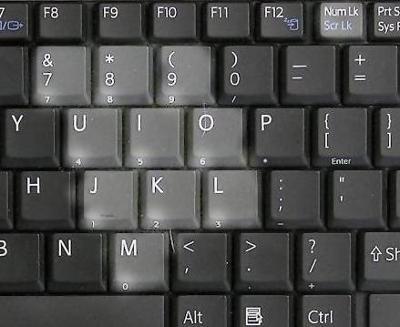
  2. You need to use the numpad that is on right side of your keyboard.
  3. Now while holding alt key type 255 from numpad(Note:you wont see the numbers getting typed). Now leave the alt key and write con, and the folder is created.
Numpads in laptops

Almost all laptops have the same numpad as shown above. To use the numpad ,what you need to do is  to hit the NumLk key thats all.Also while typing 255 from the numpad, press and hold "Fn(function)" key along with alt key.

Movies in paint

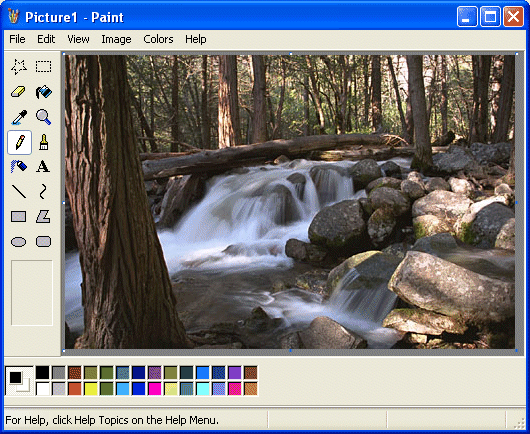
 Play movies in ms paint


To play the movie in paint:
  1. Play the movie you want to watch in any media player.
  2. Now hit "Print Screen" button.
  3. Open paint and paste(Ctrl+v).
  4. Your movie is playing. 
Note: This is just for knowledge.This also works for ms word.Also remember that the movie should be kept playing in the media player in background,else this wont work.

Sunday, 6 April 2014

Hide File or Folder using cmd

This is a very simple method for hiding files or folders on your system.The following steps will guide to the process of hiding.

Note:It is necessary that you have some basic knowledge about directories command used in cmd.

  1. Goto "START".
  2. select "run".
  3. Type "cmd".
  4. First of all check the directory in which your file resides.If it resides in C directory then type "c:" in cmd. If in D directory then type "d:" in cmd.

  5. Note: The command "cd.." exits you out of a directory.
  6. Suppose if the file/folder you want to hide resides in directory "C" not in any folder, then type
    "attrib filename +s +h". Now, check the c directory and you will find that the file is not there.
  7. Now to unhide the file, type "attrib filename -s -h". Now, the file is replaced.
Consider the following example:
  • Suppose the name of the file/folder to be hidden is trial in D directory within a folder named test.Open cmd type "d:".
  • Now type "cd test".
  • Now type "attrib trial +s +h" to hide the trial file/folder .
  • If you want to unhide type"attrib trial -s -h". Remember that while unhiding the file/folder goto the exact location in directory to unhide else it wont unhide the file.Here the location of file/folder is c:\trial.